








The Flow Builder Trap: When Automation Becomes Unmanageable
Salesforce Flow Builder has democratised process automation, granting administrators and business analysts the clicks-not-code power to construct sophisticated backend logic in minutes. However, as business requirements multiply and independent teams deploy overlapping logic, organisations frequently fall into the Flow Builder trap: when automation becomes unmanageable. What began as a streamlined library of automated helpers can rapidly spiral into a web of conflicting triggers, opaque error emails, and brittle architecture. In this guide, we break down why declarative systems break down at scale and outline practical architectural frameworks to restore clarity, maintainability, and speed to your automation engine.
How Rapid Declarative Growth Turns Into Technical Debt
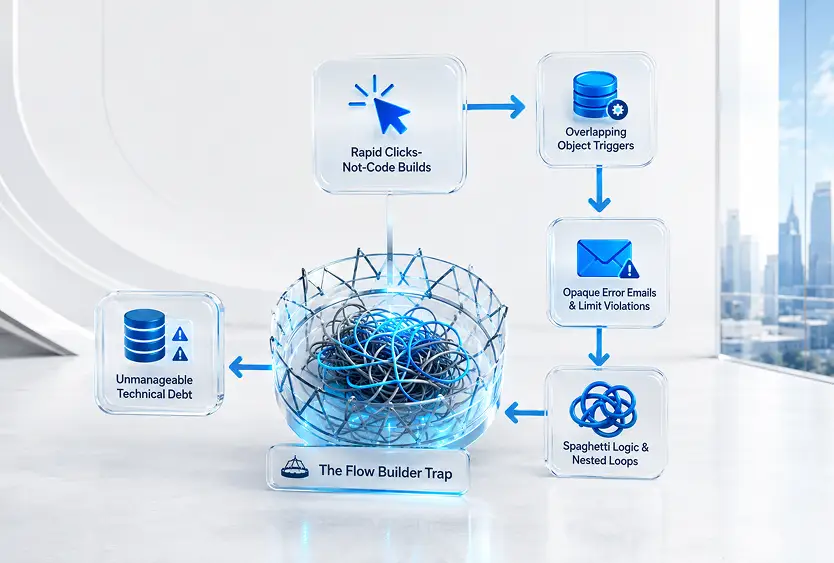
The transition from a well-ordered automation setup to an unmanageable environment rarely happens overnight. Instead, it is the cumulative result of incremental changes made without an overarching architectural blueprint.
The Absence of Trigger Orchestration
When multiple record-triggered flows operate on the same object, such as Opportunity or Account, without a clear order of execution, system behavior becomes unpredictable. One flow updates a field, which inadvertently fires a second flow, which in turn triggers a process builder or Apex class. This circular cascade leads to governor limit violations and unexpected data modifications."Spaghetti" Logic and Nested Loops
In coding environments, developers follow strict design patterns to avoid redundant operations. In visual builders, it is dangerously easy to place database queries (Get Records) or data updates (Update Records) inside loop elements. While this may pass initial testing on small sample sizes, it inevitably crashes in production when handling bulk data updates.Analogy: Imagine building a house where five different electricians install wiring without looking at a master blueprint. Each individual light switch works during a solo test, but flipping three switches at once trips the main circuit breaker. Unorchestrated flows operate the exact same way.
The Hidden Operational Costs of Automation Sprawl
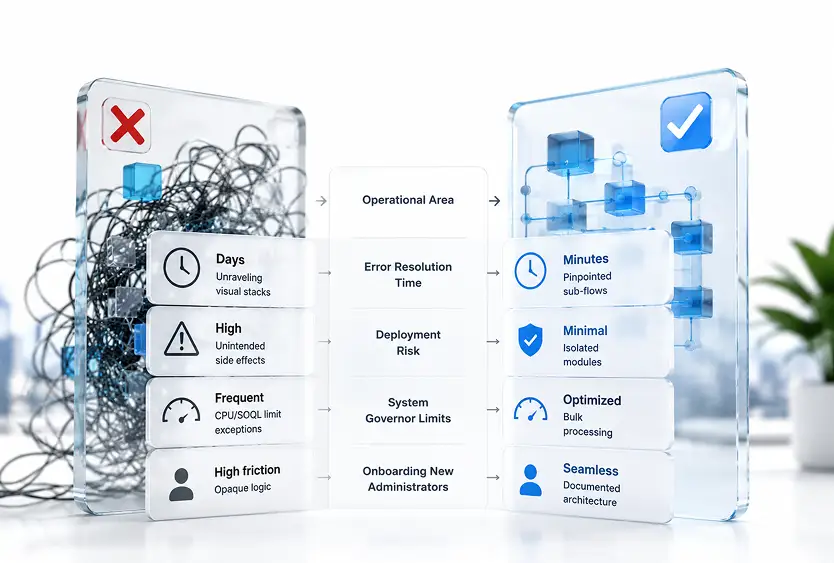
When automation maintenance consumes more time than building new capabilities, the business suffers across multiple dimensions.
The Debugging Nightmare
When a flow fails in production, Salesforce sends an automated error email filled with visual execution paths and variable states. Deciphering these stack traces across multiple intertwined flows requires hours of forensic investigation, delaying critical business operations.Reduced Agility and Deployment Fear
When administrators are afraid to update an existing flow because they cannot predict what else might break, innovation grinds to a halt. Teams default to creating new flows to patch existing logic, compounding the underlying complexity rather than solving it.Strategies to Escaping the Flow Builder Trap
Untangling complex automation does not require scrapping your existing processes and starting over. By applying disciplined design principles, we can transform a tangled web into a modular, maintainable automation ecosystem.
Enforce a "One Flow Per Event" Architecture
Standardise your record-triggered automation by consolidating logic under a master trigger flow for each object and event (e.g., one Before-Save flow and one After-Save flow per object). Use entry conditions and decision elements inside the master flow to route processing logically, ensuring predictable execution order.Decouple Complex Logic Using Reusable Sub-Flows
Instead of building massive, all-in-one flows that span dozens of screens and branches, break your logic down into smaller, single-purpose sub-flows.- Master Orchestration Flow: Handles trigger evaluation and routes data.
- Sub-Flow A: Calculates specialized pricing rules.
- Sub-Flow B: Sends external notification payloads.
- Sub-Flow C: Updates related entitlement records.

This modular structure allows teams to update or test a single business rule without risking the stability of the entire automation chain.
Build Robust Fault Handling and Custom Logging
Never leave error management to generic system emails. Attach Fault Paths to every data element (Create, Update, Delete, Get) within your flows. Direct these fault paths to a standardized sub-flow that logs the error details into a custom Salesforce object and alerts the system administrator with actionable context.Establish Strict Naming Conventions and In-App Documentation
A flow without descriptions is a mystery waiting to happen. Enforce mandatory completion of the Description field for every flow version and individual element. Use clear, action-oriented naming conventions that state what the element does, not just how it works.Conclusion: Reclaiming Control of Your Automation Ecosystem
Falling into the Flow Builder trap: when automation becomes unmanageable is a common milestone for growing organisations, but it does not have to be a permanent state. By treating declarative automation with the same architectural discipline as custom code, enforcing modular design, clear orchestration, and robust error logging, we can build a resilient foundation that scales effortlessly alongside your business.
Ready to audit and optimize your Salesforce automation architecture? Contact our platform strategy team today to evaluate your flow setup and streamline your digital operations.