








Why Security Gets Deprioritized in Salesforce Orgs, Until It’s Too Late
In the rush to deliver new features, automate complex workflows, and boost user adoption, enterprise teams frequently fall into a dangerous trap: security gets deprioritized in Salesforce orgs. Because security controls rarely generate direct revenue, leadership often views permission management as a back-office administrative detail rather than a core business risk. However, as CRM instances expand to store sensitive customer data, financial metrics, and proprietary intelligence, treating data governance as an afterthought exposes organisations to severe compliance failures and costly data leaks. In this guide, we break down why security lapses occur in growing orgs and outline practical steps to build a proactive, business-enabling security framework.
The Root Causes of Security Neglect in Salesforce Environments
Security gaps in Salesforce instances rarely stem from bad intentions. Instead, they are the predictable side effect of rapid organizational scaling and competing business priorities.
The "Speed Over Safety" Paradox
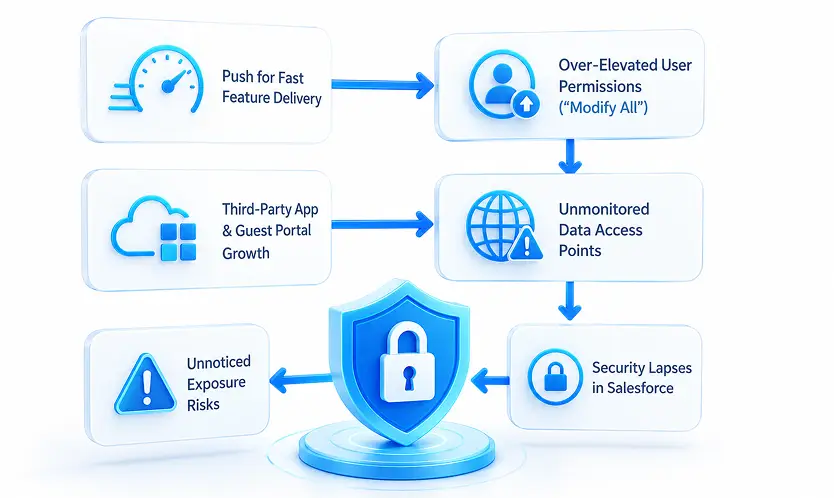
When business units demand immediate access to new fields, reports, or automation, administrators face intense pressure to ship changes quickly. When a user cannot access a critical record, the fastest workaround is often granting elevated permissions like "Modify All Data" or assigning broad permission sets. While this solves the immediate access issue, it creates long-term structural vulnerabilities that accumulate over timeThe Hidden Expansion of Public Portals and Integrations
Modern Salesforce orgs do not exist in isolation. Through Experience Cloud portals, third-party AppExchange integrations, and external APIs, instances constantly exchange data with outside users. Configuring guest user sharing rules or API user permissions incorrectly can inadvertently expose internal customer records to the public internet without triggering any immediate system alarms.Analogy: Deprioritizing security in your CRM is like installing high-tech deadbolts on your front door while leaving the ground-floor windows unlocked. The house feels secure from the front hallway, but the real exposure lies in the secondary access points no one monitors.
The True Cost of Reactive CRM Security
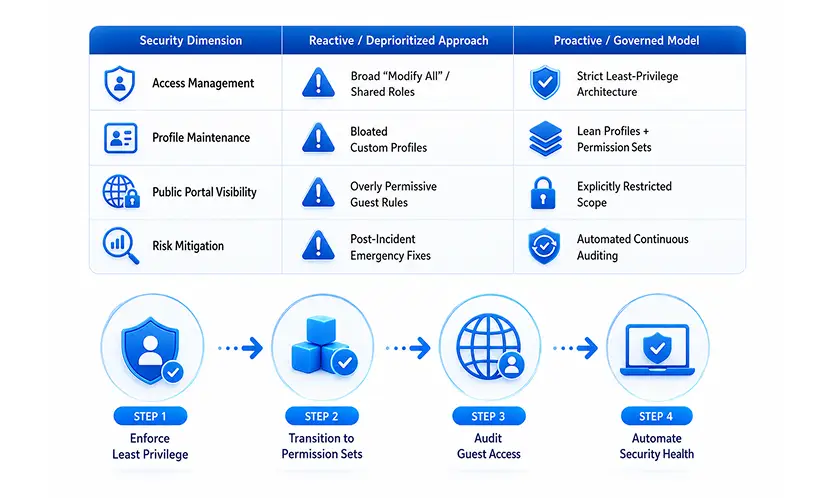
Waiting for an audit finding or a data exposure incident to address org security carries immense operational, financial, and reputational consequences.
Elevated Risk of Internal and External Data Exposure
Overly permissive access controls do not just invite external breaches; they significantly increase internal risk. When employees have access to data outside their job scope, sensitive employee records, executive communications, or customer financial details can easily leak across departments.Compounding Technical and Compliance Debt
The longer an org operates without strict permission governance, the harder it becomes to remediate. Stripping away legacy permissions from hundreds of active users without breaking existing business workflows requires extensive testing. This technical debt leaves the system fragile and makes regulatory compliance audits far more painful.Strategies to Embed Security Without Slowing Down Innovation
Protecting your Salesforce environment does not require halting business progress. By implementing systematic data governance, we can safeguard sensitive assets while keeping user workflows fast and seamless.
Adopt a Strict "Least Privilege" Access Model
Base your security architecture on a simple principle: grant users access only to the specific data and tools required for their daily tasks. Ensure default organization-wide defaults (OWD) are set to Private or Read-Only for sensitive objects, using targeted sharing rules or permission sets to open access strictly as needed.Decouple Access from Profiles Using Permission Set Groups
Move away from creating dozens of custom profiles with broad administrative rights. Instead, adopt a minimal profile strategy (such as the standard Minimum Access profile) and grant functional capabilities using modular Permission Sets and Permission Set Groups. This modular approach simplifies access reviews and prevents permission bloat.Conduct Regular Public Access and Portal Audits
If your organisation utilizes Experience Cloud or public-facing sites, perform routine reviews of guest user profiles and sharing configurations. Ensure guest users cannot view internal records, upload unrestricted files, or execute privileged backend logic.Leverage Automated Health Checks and Shield Tools
Make security monitoring a standard operational task rather than an annual event. Utilize built-in tools like Salesforce Security Health Check to baseline your configuration against recommended standards. For enterprise orgs handling regulated data, implement real-time event monitoring and data encryption tools to track suspicious data exports automatically.Key Takeaways
- Prioritise proactive governance: Treating security as an ongoing priority prevents high-stakes compliance failures and expensive remediation projects
- Enforce least privilege: Keep default sharing settings restrictive and open data access strictly based on explicit business needs.
- Modernise permission management: Use lean profiles paired with modular permission set groups to eliminate privilege creep.
- Monitor public endpoints: Routinely review guest user access rules and integration profiles to protect external boundaries.
Conclusion: Securing the Foundation for Sustainable Growth
Understanding why security gets deprioritized in Salesforce orgs is the first step toward building a more resilient enterprise. By shifting from a reactive mindset to a governed, permission-set-driven architecture, we can protect critical data assets without sacrificing administrative agility or end-user productivity.
Ready to evaluate your org's security posture and permission architecture? Contact our security and governance experts today to schedule a comprehensive system health audit.