







Salesforce DevOps Center vs Change Sets: What’s the Difference?
For over a decade, inbound and outbound change sets served as the default deployment mechanism for declarative Salesforce administrators. However, as enterprise orgs grow in complexity and development teams expand, traditional deployment tools often create deployment bottlenecks, lost tracking histories, and overwritten code. Evaluating Salesforce DevOps Center vs change sets reveals how modern source-driven release management changes how we package, test, and push metadata across environments. In this guide, we break down the core architectural differences, highlight key functional upgrades, and outline how your team can adopt modern release workflows without adding unnecessary friction.
The Evolution of Salesforce Deployment Architecture
To appreciate why Salesforce developed DevOps Center, we must first look at how metadata tracking was traditionally handled across sandboxes.
The Limitations of Traditional Change Sets
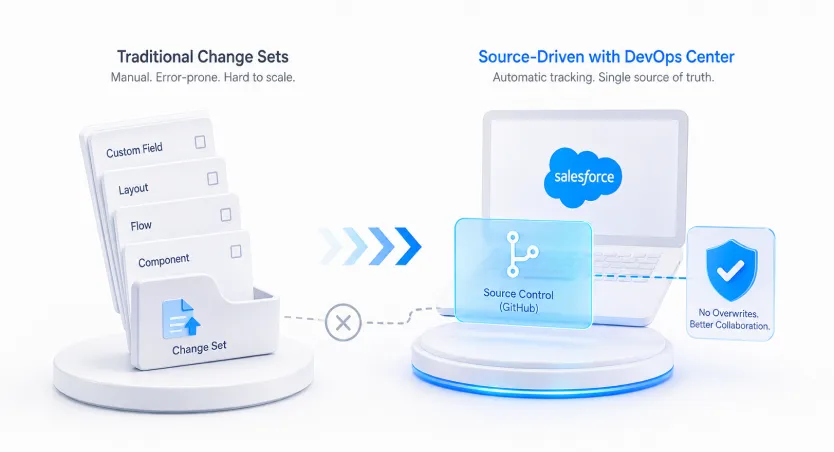
Traditional change sets rely on a manual point-to-point release structure. Administrators must manually search for, select, and add every individual custom field, layout, and flow component into a package. If a dependency is missed, the deployment fails, forcing the team to clone the change set and start over.The Shift to Source-Driven Development
DevOps Center bridges the gap between low-code administrators and pro-code developers. By using source control (such as GitHub) as the single source of truth under the hood, changes are tracked automatically. This prevents team members from accidentally overwriting each other's work in shared environments.Analogy: Using change sets is like hand-packing a moving van without an inventory list—if you forget one box, you have to drive all the way back to get it. DevOps Center works like an automated logistics system that tracks every item in real time, logs who packed it, and ensures all dependencies arrive together safely.
Comparing Salesforce DevOps Center vs Change Sets Across 4 Core Pillars
Understanding the operational differences helps enterprise teams evaluate when and how to transition away from legacy tools.
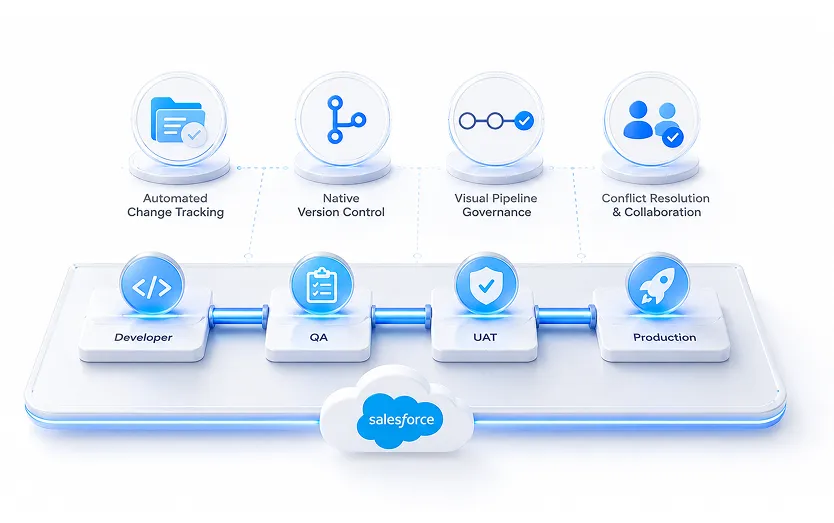
Pillar 1: Automated Change Tracking vs. Manual Selection
With change sets, admins must keep manual logs of every metadata element modified during a sprint. DevOps Center tracks modified metadata inside connected development sandboxes automatically. Users simply select the tracked changes from a clean interface and assign them to a specific work item.Pillar 2: Native Version Control
Change sets operate strictly between connected Salesforce environments without any external backup. DevOps Center seamlessly integrates with modern source control providers like GitHub. Every change approved in DevOps Center creates a structured commit and pull request in the background, maintaining a permanent audit trail.Pillar 3: Visual Pipeline Governance
Moving a change set across multiple sandboxes (e.g., Developer → QA → UAT → Production) requires manually recreating or re-uploading packages at every stage. DevOps Center provides a visual pipeline board where work items move sequentially through defined stages, reducing release errors and streamlining deployment workflows.Pillar 4: Conflict Resolution and Collaboration
When two administrators modify the same record layout in change sets, the last deployment silently overwrites the first. DevOps Center detects metadata conflicts early in the pipeline, allowing teams to review conflicting changes before pushing updates into staging or production.A 4-Step Transition Plan for Platform Executives
Migrating from change sets to DevOps Center does not require a complete disruption of your team's existing release schedule.
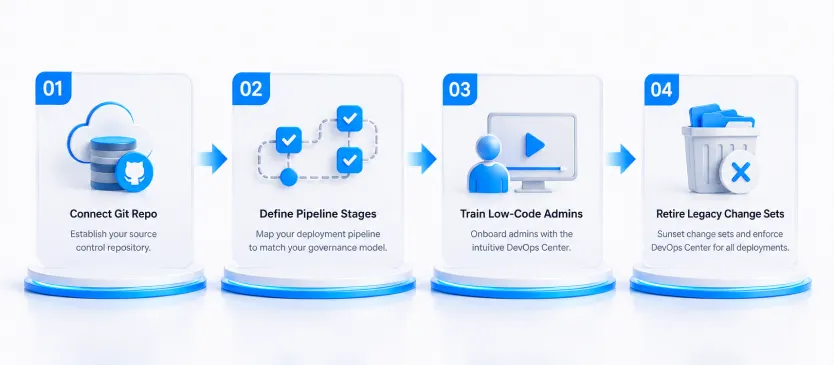
- Establish Your Source Control Repository: Set up a dedicated cloud repository (such as GitHub) to serve as the central source of truth for your org's metadata configurations.
- Map Your Deployment Pipeline: Configure your stages within DevOps Center to mirror your company’s governance model (e.g., Sandbox Development → Integration Staging → Production).
- Onboard Declarative Builders: Train administrators to use the intuitive DevOps Center point-and-click interface. Admins can commit changes and move work items without needing to learn complex command-line tools.
- Sunset Legacy Change Sets: Phase out the use of change sets for new projects. Enforce the use of DevOps Center for all metadata deployments to maintain complete audit visibility across your enterprise.
Key Takeaways
- Automatic tracking saves time: DevOps Center automatically detects metadata modifications, eliminating manual change logs.
- Git is the source of truth: Modern releases link directly to version control, providing full audit histories and commit tracking.
- Visual pipeline management: Move work items seamlessly across development, testing, and production environments.
- Prevents code overwrites: Built-in conflict detection protects custom configurations from accidental deletion.
- Low-code friendly: Admins enjoy a clean point-and-click user experience without needing terminal commands.
Conclusion: Modernizing Your Salesforce Release Management
Comparing Salesforce DevOps Center vs change sets demonstrates a clear shift toward structured, source-driven deployment pipelines. By adopting DevOps Center, enterprise organizations can eliminate deployment errors, improve team collaboration, and deliver business value faster while maintaining strict release governance.
Ready to modernize your release strategy and upgrade your deployment pipeline? Contact our DevOps consultation team today to build a customized migration roadmap for your organization.