








Salesforce Summer Release Notes , Translated for Humans
Every seasonal release document published by Salesforce spans hundreds of pages filled with dense technical specifications, developer notes, and platform edge-cases. Searching through these updates to extract real business value often feels like looking for a needle in a haystack, leaving busy executives and system administrators wondering what actually impacts their daily operations. In this guide, we provide the Salesforce summer release notes translated for humans, stripping away developer jargon to highlight the strategic capabilities, workflow improvements, and platform enhancements that matter most to your leadership team.
The Big Picture: Strategic Themes Behind the Summer Upgrades

Rather than treating seasonal updates as a random collection of features, we must view them through the lens of enterprise productivity. The core architectural investments in the summer release focus on three major pillars:
AI Driven by Grounded Real-Time Data
Artificial intelligence capabilities continue to shift from novelty text generation to autonomous, contextual action. However, intelligence is only as accurate as the underlying data. The summer features emphasize tighter integration between real-time telemetry and daily user workflows, ensuring predictive assistants operate on clean, deduplicated record histories.Streamlined User Interfaces and Reduced Friction
Every additional click required to log a phone call or update a field costs enterprise teams valuable time. Key UI enhancements focus on bringing dynamic, responsive components directly into core record layouts, minimizing tab-switching and accelerating daily navigation for frontline workers.Analogy: Reviewing raw release documentation is like reading an automotive factory blueprint when all you want to know is how the new model drives. Translating these notes allows us to skip the assembly diagrams and focus on the steering, mileage, and horsepower improvements.
Core Updates Translated Into Plain English
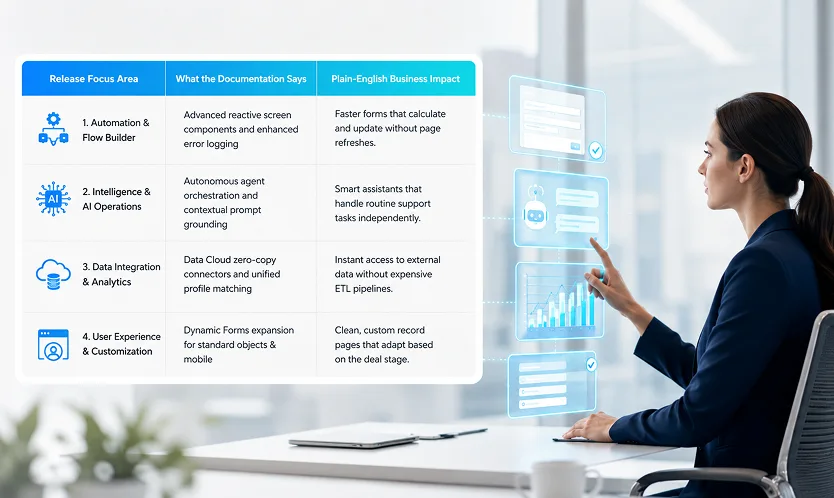
We have synthesized the major platform enhancements into four clear, operational categories so your team can prioritize deployment efforts effectively.
Automation Upgrades (Flow Builder Enhancements)
- The Plain-English Breakdown: Building custom user forms and backend automations no longer requires complex custom coding. The latest improvements allow forms to calculate totals, display conditional fields, and validate user input in real time as the user types, without reloading the web page.
- Why It Matters: Faster form completion rates mean sales reps and customer service agents spend less time clicking through administrative wizard screens and more time engaging clients.
Grounded Autonomous Assistants (AI & Agent Orchestration)
- The Plain-English Breakdown: Automated AI agents are moving beyond simple chatbots. Grounded directly in your org's verified data, these assistants can execute multi-step workflows, such as re-routing support tickets, updating contact roles, or drafting personalized follow-up emails, based on real-time event triggers.
- Why It Matters: Routine, multi-step tasks can be handled automatically in the background, freeing your human team to focus on high-value strategic interactions.
Zero-Copy Data Integration (Data Cloud Connections)
- The Plain-English Breakdown: Historically, accessing data stored in external data warehouses (like Snowflake or Amazon Redshift) required building complex data pipelines that duplicated records inside your CRM. Modern zero-copy capabilities allow Salesforce to read external data in real time without moving or duplicating the underlying files.
- Why It Matters: You gain a 360-degree view of customer activity while drastically cutting down on storage costs, sync delays, and data security risks.
Smarter Layouts Across Mobile and Desktop (Dynamic Forms)
- The Plain-English Breakdown: Page layouts are becoming fully responsive to the user's context. Administrators can set rules so that specific fields, sections, or action buttons only appear when a deal reaches a designated stage or when viewed by specific user roles, including on mobile devices.
- Why It Matters: Page clutter is virtually eliminated. Users see only the information relevant to their immediate task, improving focus and data accuracy.
A 3-Step Action Plan for Platform Executives

To maximize the return on investment from new seasonal capabilities, leadership teams should follow a structured adoption framework rather than enabling features randomly.
- Step 1: Test New Capabilities in a Pre-Release Sandbox Never deploy new features directly into your live production environment. Validate flow automations and dynamic layout updates in a full sandbox to ensure existing custom logic continues to execute smoothly.
- Step 2: Review Default Feature Enablement Settings Identify which features are enabled automatically by Salesforce versus those requiring manual administrator setup. Turn off non-essential updates until your change management team has prepared training materials.
- Step 3: Communicate Relevant Upgrades to End-Users Focus end-user training strictly on workflow improvements that save time. Highlight interface enhancements, automated field population, and faster form layouts to build excitement and drive immediate platform adoption.
Key Takeaways
- Filter for business impact: Skip raw technical documentation and focus on updates that directly improve user efficiency, data quality, and automation speed.
- Embrace low-code form building: Leverage new reactive Flow Builder features to replace clunky multi-step wizards with fast, responsive forms.
- Capitalize on zero-copy integration: Access external warehouse data in real time without paying for costly data movement or storage duplication.
- Simplify user interfaces: Deploy dynamic page layouts across desktop and mobile devices to eliminate visual clutter and keep rep focus sharp.
- Deploy deliberately: Always test seasonal updates in a dedicated sandbox environment before rolling out changes to end-users.